
Salem County Booking Photo Records
A booking photo documents a person’s appearance during a specific admission. It is not a live custody marker. Release from the Salem County Correctional Facility ends or transfers that custody episode, but it does not erase the booking event by itself. The county’s public inmate lookup can return released records when the proper option is selected. Its result fields include the name, date of birth, Booking Number, Permanent ID, and Release Date. Those fields help tie a photo request to the right event.
New Jersey does not treat every mugshot as automatically open to all requesters in every setting. Record context and exemptions matter. State guidance discusses limits that can apply to photographs and criminal-investigation records. The sound approach is to ask the agency that holds the image for one identified booking photo, then let its records custodian apply current law and any needed redactions. An old image also says nothing about whether the person is now free, held elsewhere, or under supervision.
Find Salem County Release Mugshots
No single photo archive covers every person released from Salem County custody. The right channel depends on whether the admission was at the county facility, in New Jersey state prison, or with another reporting agency. Start with an official identity match. Then use the channel tied to that custody event.
| Channel | Photo status | How to access |
|---|---|---|
| Salem inmate lookup | Detail code references an image object, but display is not confirmed | Search one person and select “Include released inmates” |
| County OPRA request | A specific booking photo may be requested | Identify the booking and image; disclosure may involve exemptions or redaction |
| NJDOC offender search | A state-prison record may carry an image | Match the state record and confirm the live result layout |
| VINELink | Varies by reporting agency | Use for custody status and alerts, not as the main photo archive |
| NJ public registry | May show a photo for a qualifying registrant | Use only when the person falls within public notification rules |
| News or agency release | Possible for a specific event | Check the date, caption, and original context |
| Third-party archive | May retain an old image | Treat as unverified and corroborate with an official record |
A county Release Date is the endpoint of that Salem booking. It may mean community release, but it can also mark transfer to NJDOC, another county, federal custody, or immigration custody. The photo and the date must therefore be read with the releasing and receiving agencies attached.
Salem Released Record Photo Check
The official Salem inmate lookup is the first county source for a named person. Search by first and last name, add the date of birth if known, and select “Include released inmates.” Stronger identifiers include Booking Number, Permanent Number, State ID, County ID, FBI Number, and ICE Number. A matching result should be checked against more than a name.
The live implementation passes an image-system identifier into its detail navigation. That technical clue is not proof that every released record shows a photo. Open the matching detail and inspect it. If an official image is visible, preserve the Booking Number and Release Date with the source date. If no photo appears, move to a specific records request instead of assuming no image exists.
The county source shown in this captured search form documents the released-person checkbox and identity fields.
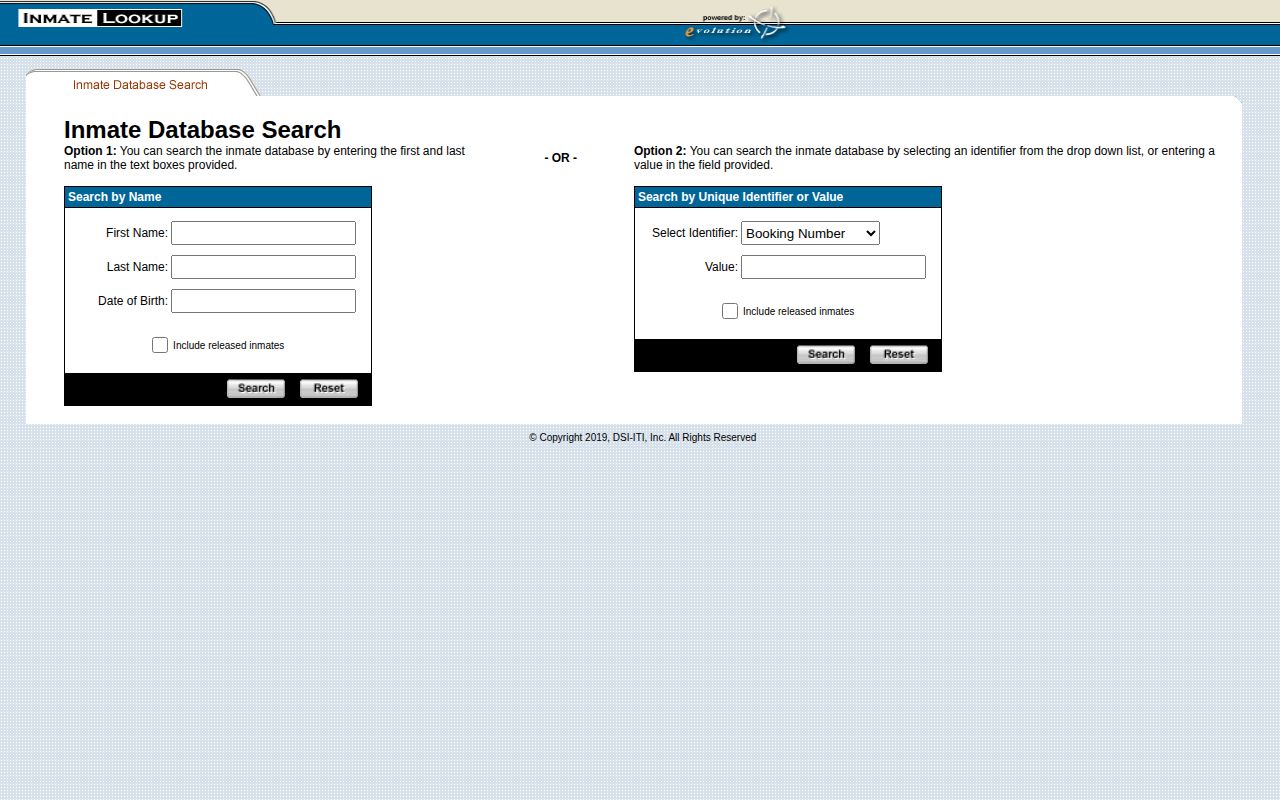
The capture supports the official search path, but it does not establish that a booking photo is displayed on every released-person detail.
Request Salem County Booking Photos
When the public detail does not show an image, use the Salem County OPRA process. A narrow request is easier to identify and review than a demand for a broad gallery. Ask for “the booking or admission photograph associated with Booking Number [number] and booking date [date].” Include the full name, date of birth, facility, and likely booking range when known.
- Confirm the person and custody event in the Salem lookup. Save the Booking Number or Permanent ID.
- Open the county OPRA page and form. Describe the existing booking photograph, not a question about why an arrest or release occurred.
- Choose the preferred delivery method. Electronic delivery can avoid paper duplication charges when the record is available in that form.
- Submit the request to the county custodian and keep the receipt. Follow up if the county’s stated receipt email does not arrive within 24 business hours.
- Review any response, redaction, or denial for the stated legal basis. Ask the custodian about correction if the image is tied to the wrong person or booking.
New Jersey OPRA generally calls for access as soon as possible and no later than seven business days for a complete, noncommercial request for currently available records. Stored material or other statutory circumstances can take longer with notice. Salem’s form lists paper copy rates of $0.05 for letter pages and $0.07 for legal pages, plus lawful actual, delivery, or special-service costs where applicable.
The Salem County released-inmate search and release-record path shows how that photo request fits with the county Release Date, court disposition, and receiving-custody checks.
Note: OPRA requires access to existing, nonexempt records; it does not require Salem County to create a new image file or answer research questions.
State Release Mugshots for Salem
A person transferred from Salem County Correctional Facility to state custody follows a different record path. Search the NJDOC offender system and match the SBI or inmate number, date of birth, aliases, county of commitment, and incarceration history. A Salem County commitment identifies the case venue. It does not mean the person was held in a state prison located in Salem County.
NJDOC records may associate an image with a state prisoner, but the live layout should be checked before relying on the image. The key past-release field is Date Out-of-Custody. Current Facility and status help show whether state physical custody continues. New Jersey normally removes a completed custodial record from the public web search one year after the custodial term ends, subject to the stated exceptions for certain lifetime-supervision records. An absent older record is not proof that no state admission or photo existed.
The State Police stores digital mug photos in its SBI identification repository for law-enforcement functions. That fact does not create a public SBI photo search. Use the public NJDOC record or a focused state records request for an identified admission image.
No Salem Jail Photo App
No jail-information or recent-release mobile app was identified in the official Salem County Sheriff corrections navigation reviewed for the research. Do not substitute an unrelated app or imply that a mobile product shows Salem booking photos. The Sheriff links a Facebook page, but that social channel is not a systematic release roster or photo archive.
This makes the IML detail and OPRA request more important in Salem County than an app-based route. The county also does not publish a chronological page for everyone released within one day. The Salem County released-last-24-hours process uses the same named-person lookup and Release Date field. It cannot produce an official all-person photo feed.
Verify Salem Mugshot Archives
Third-party archives and event-specific news reports can preserve a booking image after release. They are discovery leads, not custody records. A republished photo may be stale, mislabeled, detached from a later dismissal, or tied to a person with a similar name. Do not use a commercial archive as proof of identity, release, or present legal status.
Agency and news releases are also selective. They may show a photograph connected to one investigation, but they do not form a complete Salem County booking archive. Check the original publication date, the named agency, the caption, and the cited case. Then compare the image with an official booking number, court docket, NJDOC identifier, or Salem release result.
VINELink is built for custody status and notifications. Photo availability depends on the reporting agency and should not be assumed. The New Jersey public sex-offender registry may display an image for a qualifying registrant, yet public inclusion turns on notification rules and is not universal. Neither source replaces a county release record.
Salem Mugshots and Expungement
An expungement is the extraction and sealing of qualifying records about arrest, detention, trial, or disposition. Once the order is processed, ordinary public government searches may stop returning affected records. Eligibility and timing vary. The New Jersey Courts expungement self-help route provides the current process, and Salem’s Criminal Division has a local expungement clerk.
Expungement does not support a promise that every independent copy, old article, or repost vanishes at once. For an official image that remains linked in error, send the order or correction request to the agency maintaining that record. For a news image, use the publisher’s correction process and give the docket or order that explains the change.
Public-record and use notice: A Salem booking photo is not categorically public in every record context, and removal or correction must be addressed with the source. This site is not a consumer reporting agency as defined by the Fair Credit Reporting Act (FCRA). Mugshot data may not be used for any FCRA-covered purpose.
New Jersey Mugshot Payment Law
P.L.2017, c.123, codified at N.J.S.A. 2A:58D-3 to -4, bars soliciting or accepting a payment to refrain from disclosing criminal-justice identifying information, including an arrest photograph. It protects against coercive pay-to-remove conduct. It does not order every government office to publish every photo, and it does not guarantee that a lawful image must be erased on demand.
Do not pay an unknown publisher based on a claim that payment is the only way to address an image. Preserve the demand, check the court record, and use the official correction or expungement route that fits the facts. Official offices can explain their own record, while courts control expungement orders.
Salem County Expungement Help
Salem County has a clear local court contact for expungement filings. The Criminal Division expungement clerk is at the Salem County Courthouse, 92 Market Street, Salem, and can be reached at 856-878-5050 ext. 15855. Indictable matters run through Superior Court, while municipal cases remain with the proper municipal court. The court route should match the docket.
A February 2025 Salem clinic brought together Rutgers Law, South Jersey Legal Services, the Office of the Public Defender, and local prosecutors. A Rutgers report on the Salem event states that more than 55 people received help. That was a past event, not a standing appointment or promise of a future clinic. Start with the current Judiciary self-help and contact pages.
Note: A missing online mugshot can reflect an expungement, display policy, retention limit, or simple mismatch, so confirm the reason with the source.